“Just tell your server what to do” sounds like science fiction. Except it’s not. ICNLI (Infrastructure Contextual Natural Language Interface) is already working in production at WebHostMost, replacing traditional control panels with natural conversation.

“Just tell your server what to do” sounds like science fiction. Except it’s not. ICNLI (Infrastructure Contextual Natural Language Interface) is already working in production at WebHostMost, replacing traditional control panels with natural conversation. Here’s why this matters and why every hosting provider will adopt something like it within three years.
Control panels are dead. They just don’t know it yet.
For twenty years, we’ve used the same paradigm – click buttons, navigate menus, remember where features hide. cPanel has 387 distinct features across 47 sections. Plesk isn’t much better. Users spend hours learning interfaces that still require technical knowledge to use safely.
The promise of AI was supposed to fix this. Chatbots that understand your questions and provide helpful answers. Except they don’t actually know your infrastructure, can’t take action on your behalf, and forget everything between conversations. They’re glorified documentation search engines.
ICNLI changes this completely. It’s not a chatbot that gives advice about servers – it’s an interface that understands YOUR specific infrastructure and executes real operations based on natural conversation. The difference is profound.
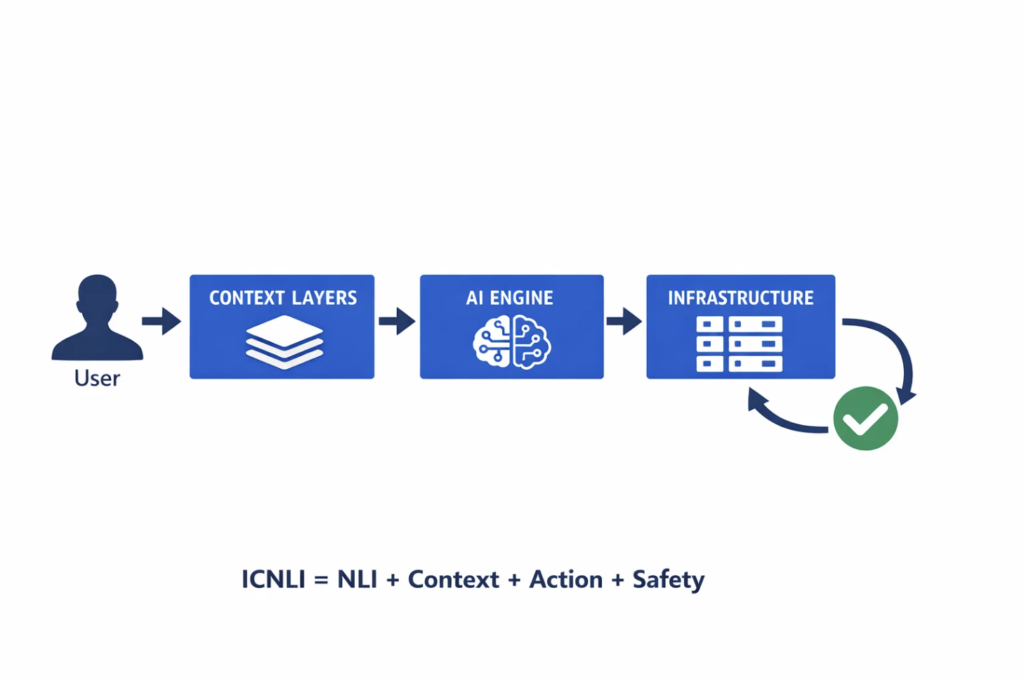
ICNLI stands for Infrastructure Contextual Natural Language Interface. The specification was created by Valentin Scerbacov at Blue Bee Web (WebHostMost’s parent company) and defines how AI interfaces should work with infrastructure.
The formula is simple:
ICNLI = Natural Language + Deep Context + Real Actions + Safety
Each component matters:
Natural Language means talking normally. “My website is slow” not “ssh user@server; tail -f /var/log/nginx/error.log”. You describe what you want or what’s wrong. The system figures out the technical details.
Deep Context means the system knows everything about your infrastructure. Not just “you have servers” – it knows which servers, what’s running on them, how they’re configured, what depends on what, and what you changed yesterday. This context exists across eight hierarchical levels from platform capabilities down to individual file relationships.
Real Actions means actually executing operations. Not “here’s the command to restart MySQL” – it restarts MySQL. Not “you should update these packages” – it updates them. The system does the work, not just advises you on it.
Safety means the system won’t accidentally destroy your infrastructure. Every operation has a risk level. Dangerous operations require explicit confirmation. Critical operations require typing an exact phrase plus a cooling period. The AI proposes, you decide, then it executes.
Generic AI assistants like ChatGPT or Claude are impressive at understanding language. But they don’t know anything about your infrastructure. Every conversation starts from zero.
ICNLI systems maintain nine levels of context (L0 through L8):
Level 0: Platform – What the system itself can do, current version, available features.
Level 1: Actor – Who you are, your role, your permissions, your authentication method.
Level 2: Account – Your billing status, subscription tier, resource quotas, payment history.
Level 3: Services – What you’ve purchased – VPS hosting, domains, SSL certificates, backups.
Level 4: Servers – Physical/virtual servers, IP addresses, operating systems, resource usage.
Level 5: Applications – Websites, databases, email accounts, installed software.
Level 6: Resources – Individual files, DNS records, database tables, configuration values.
Level 7: Relationships – What depends on what, cascade impact analysis, interconnections.
This depth of context enables interactions that sound magical but are just thorough data integration.
Here’s a real example from WebHostMost’s Webbee implementation (the reference ICNLI system):
Without ICNLI:
User navigates to: Performance → Server Resources → Databases → MySQL
User clicks: Show Active Connections
User sees: 94/100 connections used (confusing)
User googles: "mysql too many connections"
User reads: Various stackoverflow answers
User SSH's to server
User runs: SHOW PROCESSLIST;
User tries to identify problematic queries
User maybe kills some connections
User hopes it works
With ICNLI:
User: "My website is slow"

ICNLI: "I analyzed example.com on server prod-web-01.

Found Issues:
1. ❌ Database connections: 94/100 (critical threshold)
   Root cause: Abandoned connections from backup job
   Impact: New requests being rejected

2. ⚠️ 23 large images not optimized (47MB total)
   Recommendation: Could reduce to ~8MB

3. ✅ Server resources: Normal (CPU 34%, RAM 58%)

Quick fix: I can kill the idle connections and restart
the backup job with connection limits. This takes ~10
seconds with zero downtime.

Proceed? (yes/no)"
Notice what happened. The system:
This is possible because of deep context. The system knows your infrastructure completely.
The most important safety mechanism in ICNLI is the TWO-STEP protocol. Every operation that changes infrastructure requires confirmation.
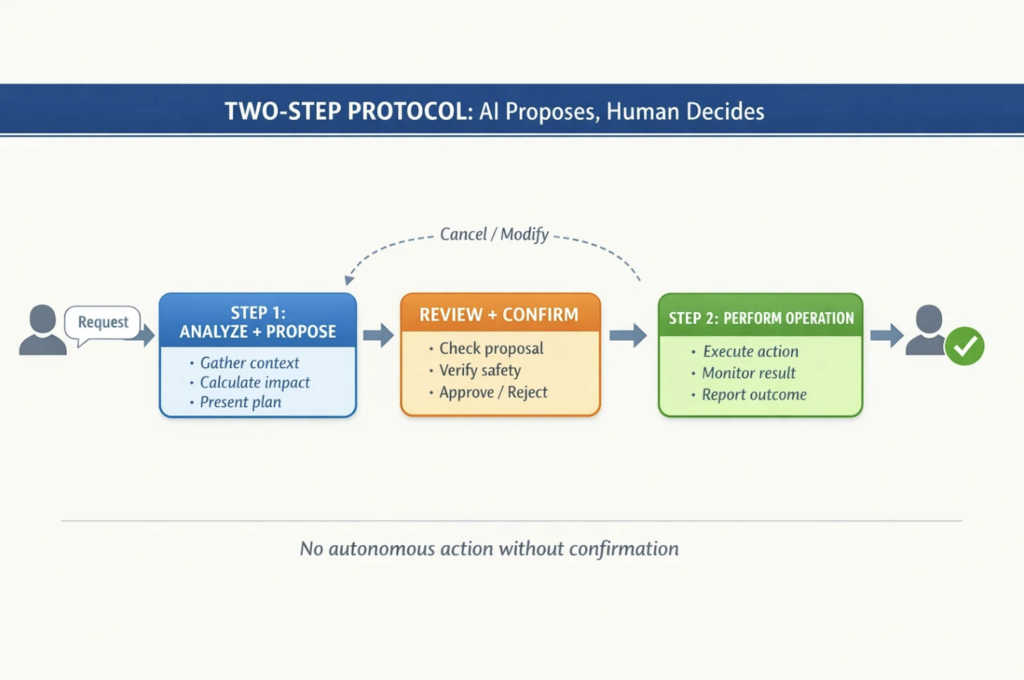
Step 1: Propose The AI analyzes your request, gathers all relevant context, determines what needs to happen, calculates impact and risk, then presents a clear plan.
Step 2: Execute You review the plan. If it looks good, you confirm. Only then does the system perform the operation. If something seems wrong, you cancel and ask for clarification.
This ensures the AI never takes autonomous action on critical infrastructure. You’re always in control. The AI does the analysis and execution work, you make the decisions.
Example of TWO-STEP in action:
User: "Restart my database"

ICNLI: "I'll restart database 'myapp_prod' on server prod-web-01.

Impact Analysis:
• example.com will be unreachable (~30 seconds)
• api.example.com will timeout during restart
• 3 background jobs will reconnect automatically
• No data loss risk

Last restart: 14 days ago
Uptime before restart: 336 hours
Reason for restart: Manual request (no issues detected)

Proceed? (yes/no)"

User: "yes"

ICNLI: "Restarting database...
✅ Database restarted successfully (28 seconds)
✅ All applications reconnected
✅ No errors detected

Current status:
• Response time: 12ms (normal)
• Active connections: 8/100
• Query cache: Warming up (normal after restart)"
ICNLI defines five safety levels that determine how much confirmation is required:
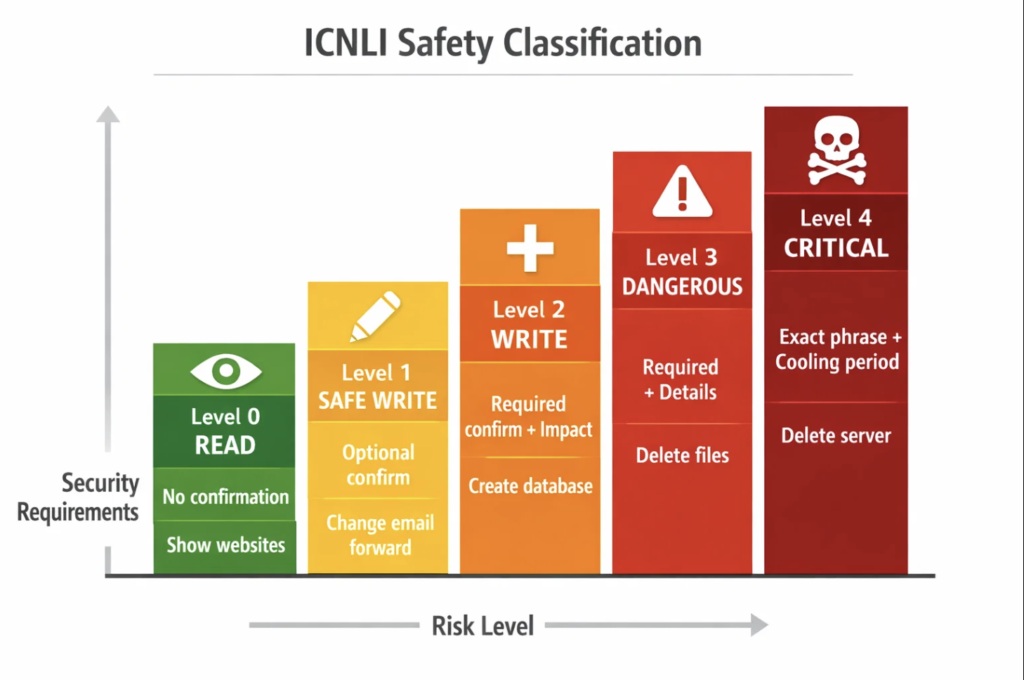
Level 0 (Read): Information queries. No confirmation needed. Examples: “Show my websites”, “Check server status”, “What’s my disk usage?”
Level 1 (Safe Write): Reversible changes with minimal risk. Examples: “Update my email forward”, “Change PHP version for staging site” Confirmation: Optional (can be auto-confirmed with user preference)
Level 2 (Write): Significant changes but recoverable. Examples: “Create new website”, “Install WordPress”, “Add database” Confirmation: Required with impact summary
Level 3 (Dangerous): Destructive operations with serious consequences. Examples: “Delete database”, “Remove website files”, “Drop DNS zone” Confirmation: Required + Must confirm understanding of consequences
Level 4 (Critical): Irreversible destruction of valuable resources. Examples: “Delete server”, “Purge all backups”, “Terminate account” Confirmation: Must type exact phrase + 30-second cooling period + Cancel option
The system won’t let you accidentally nuke production. Higher risk requires stronger confirmation.
Traditional control panels are desktop web interfaces. Mobile experience is terrible. Voice control doesn’t exist. You can’t manage servers from messaging apps.
ICNLI mandates channel neutrality – identical capabilities regardless of access method.
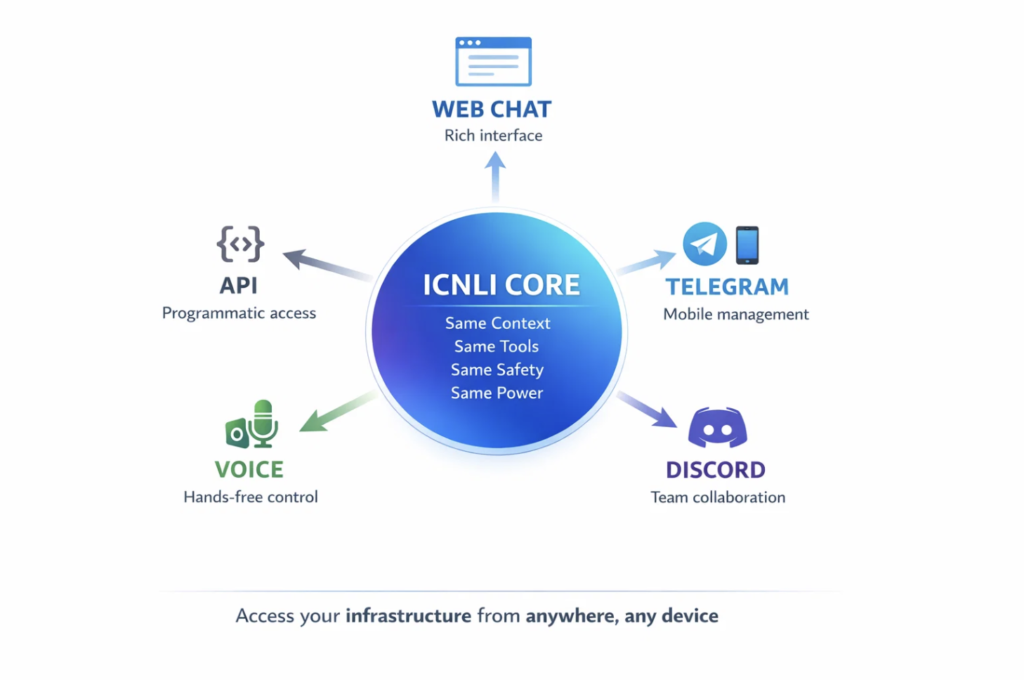
WebHostMost’s Webbee implements this today:
Web Interface: Full chat interface in the client area. Rich formatting, buttons for confirmation, visual feedback.
Telegram Bot: @WebHostMostBot. Same capabilities as web. Manage infrastructure from your phone while commuting.
Discord Bot: For teams managing infrastructure together. Shared context, collaborative management.
Voice Control: “Hey Webbee, restart my staging server” from your car. Hands-free infrastructure management.
API Access: Programmatic access to ICNLI capabilities for automation and integration.
Context persists across channels. Start a conversation on web, continue on Telegram, finish on voice. The system remembers what you were doing.
Real scenario:
[9 AM, Web Chat]
User: "I'm having issues with my WordPress site"
ICNLI: "I see example.com has some problems. Analyzing..."

[1 PM, Telegram, same user]
User: "Any update on my site?"
ICNLI: "Yes, continuing from this morning - I found that your
WordPress site example.com has a database optimization issue
and some oversized images. Ready to fix?"

[7 PM, Voice, driving home]
User: "Hey Webbee, did you fix my website?"
ICNLI: "I've identified all the issues with example.com that
we discussed today. I can apply the fixes now. Say 'confirm'
to proceed."
This cross-channel continuity is only possible with persistent context.
Control panels like cPanel and Plesk organize features into hierarchical menus. To restart a database, you navigate: MySQL Databases → Current Databases → Actions → Restart. Five clicks minimum, plus finding which database.
With ICNLI: “Restart my production database”. Done in one request.
Control panels show you all options. ICNLI shows you relevant options based on your context. Control panels require you to know what feature does what. ICNLI understands what you want and finds the feature.
Control panels are discoverable but slow. ICNLI is fast but requires asking. The ideal interface combines both – ICNLI for experienced users who know what they want, traditional interface for discovering capabilities.
Command-line interfaces are powerful but require exact syntax. systemctl restart mysql is unambiguous but only works if you know the command exists, remember the syntax, and understand what it affects.
ICNLI accepts natural requests: “restart database”, “restart mysql”, “restart the db”, “my database needs restart”. All work. The system figures out you mean the same thing.
CLIs provide no context about impact. Restarting MySQL might take down twelve websites. The CLI won’t tell you that. ICNLI analyzes dependencies and warns you.
APIs are programmable but require integration work. ICNLI has a natural language API but also provides simple conversational access for humans.
ChatGPT and Claude are remarkable at understanding language and providing advice. But they’re fundamentally advisors, not operators.
Generic AI: “To restart MySQL, SSH to your server and run: systemctl restart mysql. This will cause brief downtime for any applications using the database.”
ICNLI: “I’ll restart your MySQL database on server prod-web-01. This will interrupt example.com and api.example.com for about 30 seconds. Proceed?”
Generic AI gives generic advice. ICNLI takes specific action on your specific infrastructure.
Generic AI forgets context between conversations. ICNLI maintains full state permanently.
Generic AI can’t verify whether its advice is correct for your setup. ICNLI knows your exact configuration and only proposes operations that will work.
Maria runs an online boutique. She bought a domain shopbymaria.com and wants professional email addresses.
Traditional approach: Google “how to set up email”, watch tutorial, log into control panel, navigate to Email → Accounts, fill in forms, configure DNS records, hope she didn’t break anything.
With ICNLI:
Maria: "I want email addresses for my new domain"

ICNLI: "Great! I'll set up email for shopbymaria.com.

What email addresses do you need?
• info@ (recommended for general inquiries)
• orders@ (recommended for order notifications)
• Custom addresses?"

Maria: "info and orders"

ICNLI: "Creating:
• [email protected]
• [email protected]

I'll also configure:
✅ Spam filtering (99.9% accuracy)
✅ Email forwarding to your Gmail (you can read emails there)
✅ Professional security (SPF, DKIM, DMARC records)
✅ Auto-responder setup (optional, for away messages)

This takes about 60 seconds. Proceed?"

Maria: "yes"

ICNLI: "✅ Done! Your email is ready.

📧 [email protected]
📧 [email protected]

Both forward to [email protected]. I've sent setup
instructions to your Gmail for configuring these
addresses in your phone's email app.

Would you like me to:
• Create additional addresses?
• Set up auto-responders?
• Configure email signatures?"
Maria accomplished in two minutes what would have taken thirty minutes of tutorial-watching and panel-clicking.
Alex manages fifteen client websites. It’s 3 AM and he gets an alert – one site is down. He’s on mobile, half asleep.
Traditional approach: Panic. Open laptop. VPN to server. SSH in. Check logs. Diagnose. Fix. Document changes. Go back to sleep (maybe).
With ICNLI via Telegram:
[Alert notification]
🚨 Alert: client-site.com is DOWN (HTTP 500)

Alex: "What's wrong with client-site.com?"

ICNLI: "🔍 Analyzing client-site.com on server prod-03...

Issue found: PHP Fatal Error
Error: "Allowed memory size of 134217728 bytes exhausted"
Location: wp-includes/plugin.php:175
Trigger: WooCommerce inventory sync (started at 02:47)

Root cause: PHP memory limit (128MB) insufficient for
large product import operation.

Quick fixes:
1. Increase PHP memory to 512MB (recommended, instant)
2. Restart PHP-FPM to clear current process (temporary)
3. Disable WooCommerce inventory sync (investigative)

I recommend option 1. This increases memory for this
site only, doesn't affect other clients. Zero downtime.

Proceed? (yes/no)"

Alex: "yes"

ICNLI: "✅ PHP memory increased to 512MB
✅ Site is back online
✅ Current memory usage: 287MB (healthy)

Error resolved. Site is responding normally.
Response time: 340ms (normal range)

For permanent fix, I recommend:
• Optimize product import (runs every night)
• Add memory monitoring alerts
• Review other high-memory operations

I can set these up if you want."

Alex: "do the monitoring"

ICNLI: "✅ Memory monitoring configured
• Alert if usage >80% (410MB)
• Alert if memory errors occur
• Daily report at 9 AM with peak usage

You'll get Telegram notifications if issues appear.
Go back to sleep, I'll watch the site."
Crisis resolved in two minutes from mobile. No laptop, no SSH, no log diving.
Jordan manages infrastructure for a development agency. Twenty client sites need PHP updated from 7.4 to 8.2. Some sites might have compatibility issues.
Traditional approach: Script the update, hope nothing breaks. Or manually check each site’s compatibility, create a spreadsheet, test one by one, update in batches. Several hours of work.
With ICNLI:
Jordan: "Update all sites to PHP 8.2"

ICNLI: "Scanning all 23 websites for PHP compatibility...

Compatibility Analysis:
✅ 15 sites: Ready for PHP 8.2 (no issues detected)
⚠️ 5 sites: Need plugin updates first
   • Site A: WooCommerce 5.2 → Update to 7.1+ required
   • Site B: Contact Form 7 needs update
   • Site C, D, E: Theme has deprecated functions
❌ 3 sites: Significant compatibility issues
   • Site X: Custom plugin incompatible
   • Site Y: Theme uses removed PHP functions
   • Site Z: Requires code changes

Recommended plan:
Phase 1: Update 15 ready sites (low risk)
Phase 2: Update plugins for 5 sites, then PHP
Phase 3: Manual review for 3 problematic sites

Start with Phase 1? (yes/no)"

Jordan: "yes"

ICNLI: "Updating PHP on 15 sites to version 8.2...

✅ client1.com - PHP 8.2 (187ms response time)
✅ client2.com - PHP 8.2 (234ms response time)
✅ client3.com - PHP 8.2 (156ms response time)
[... progress for all 15 ...]

Phase 1 complete (6 minutes):
• 15 sites updated successfully
• Average response time improved 14%
• No errors detected
• All sites verified working

Ready for Phase 2? I can update the 5 plugins and
then upgrade those sites. This will take ~15 minutes.

Proceed? (yes/no)"
What would take hours of manual work or risky bulk updates happens in twenty minutes with safety checks at every step.
For developers considering ICNLI implementation, here’s how Webbee works:
Gateway Layer handles authentication, rate limiting, and routing requests from different channels (web, Telegram, API) to the processing core.
Context Aggregator (called UCG in Webbee) collects complete infrastructure state from all data sources – billing system, control panel, DNS, monitoring, logs. This builds the eight-level context model.
AI Engine receives natural language requests plus full context. Uses function calling (128 tools in Webbee) to determine what operations are needed. Plans multi-step workflows for complex requests.
Safety Layer classifies every proposed operation by risk level. Determines what confirmation is required. Validates user responses. Prevents accidental destructive operations.
Tool Orchestrator executes approved operations using durable workflows. Handles retries on transient failures. Manages multi-step operations with rollback on errors. Reports results back through the chain.
Audit System logs every interaction with full context – who asked, what they asked, what was executed, what the result was, confirmation details. Provides compliance trail and debugging capability.
The entire system is designed for reliability. Network failures don’t lose state. Server restarts don’t interrupt workflows. Operations are idempotent where possible.
Control panels are good at organizing features. They’re terrible at helping users accomplish goals.
Users don’t want to “navigate to SSL → Install Certificate → Upload Files”. They want “set up secure HTTPS for my site”. The difference is intent vs mechanics.
ICNLI interfaces accept intent and handle mechanics. This transforms user experience:
Onboarding: “Set up WordPress for my business” creates server, installs CMS, configures security, sets up email, enables backups – without the user knowing which buttons to click.
Support: “My site is broken” triggers automated diagnostics. System identifies issues and proposes fixes. Support tickets decline because problems self-resolve.
Retention: Users who can accomplish tasks stay customers. Users frustrated by complex interfaces leave. ICNLI makes infrastructure management accessible to non-experts.
Efficiency: Users complete tasks in minutes instead of hours. They’re more likely to implement features that improve their business instead of avoiding them because “it’s too complicated”.
Differentiation: Every hosting provider offers similar raw capabilities. Interface quality differentiates. ICNLI is a significant competitive advantage.
ICNLI is being developed as an open standard. The specification is public. The conformance test suite will be open source. Any hosting provider or infrastructure company can implement ICNLI-compatible systems.
Why open when WebHostMost could keep it proprietary?
Interoperability: If ICNLI becomes the standard interface for infrastructure, systems can integrate better. Your monitoring tool can speak ICNLI. Your deployment pipeline can use ICNLI. Your backup solution understands ICNLI context.
Trust: Users trust open standards more than proprietary ones. You can verify what ICNLI does and how it protects your infrastructure.
Innovation: The community can extend ICNLI faster than one company. Better ideas emerge from distributed innovation.
Adoption: Open standards spread faster. Email became universal because it was an open standard. HTTP won over proprietary alternatives. ICNLI can become the universal infrastructure interface.
WebHostMost maintains competitive advantage through implementation quality (Webbee), not by locking up the specification. Better execution beats specification ownership.
If you’re managing infrastructure today – websites, servers, databases, domains – you’re using tools that predate the AI revolution. Those tools assume you’re willing to learn their interface, remember their quirks, and translate your intent into their actions.
ICNLI flips this relationship. The interface learns YOUR infrastructure and translates YOUR intent into technical actions. You describe what you want. The system figures out how to make it happen safely.
At WebHostMost, Webbee is already doing this:
“My site is slow” → Diagnoses issues, proposes fixes, implements them with your approval.
“Set up email” → Creates accounts, configures DNS, sets up forwarding, explains how to use it.
“Backup everything” → Triggers backups for all services with verification and notification.
“What changed yesterday?” → Shows all infrastructure modifications with context and impact.
“Delete the old staging database” → Analyzes dependencies, warns about impacts, confirms you understand, then executes.
This isn’t future technology. It’s working in production today. Thousands of interactions daily. The control panel still exists (some tasks are genuinely easier with visual interfaces), but 60% of infrastructure management now happens through natural conversation.
Control panels won’t disappear immediately. They’ll become secondary interfaces for discovery and complex visual tasks. But the primary interface for routine infrastructure management is shifting to natural language with deep context.
This shift is inevitable for the same reason GUIs replaced command lines and web interfaces replaced desktop software. The new paradigm is dramatically better for most users most of the time.
ICNLI represents this paradigm for infrastructure. You’ll see more implementations. Hosting providers will adopt it. Infrastructure companies will integrate it. It will become unremarkable to talk to your servers the way you talk to colleagues.
The question isn’t whether this happens. It’s whether your infrastructure provider adopts it quickly or slowly.
WebHostMost’s Webbee is the reference ICNLI implementation. If you’re a hosting customer, it’s already available in your client area. Open the chat interface and try:
“Show my websites” “Check server status”
“What’s using the most disk space?” “Explain my last invoice”
For complex operations, start on smaller tasks to understand how TWO-STEP confirmation works:
“Create a test database” “Install WordPress on a subdomain” “Add an email forward”
Then progress to production tasks when you’re comfortable with how the system protects you.
For non-customers interested in ICNLI-powered hosting:
🚀 New customers: Use promo code ICNLI for 20% off annual and 3-year plans. Experience infrastructure management through natural conversation instead of control panel clicking.
💡 Existing customers: Webbee is included free with all hosting plans. Just open the chat interface and start talking to your infrastructure.
🎯 Developers/Providers: Read the ICNLI specification at icnli.org. Consider implementing ICNLI-compatible systems for your infrastructure.
Want to learn more about advanced infrastructure management? Check out our other technical guides:
And explore our ICNLI-powered hosting plans – because infrastructure management should be conversation, not navigation.
Have you seen our other articles?
